Segulah613
Pre Op
-
Joined
-
Last visited
-
-
-
-
-
. I'm going to try this.. Add in an extra shake a day! I too have been at a stall. Thank you so much for your help! And you look great BTW! I seen your pics on another post! Your doing amazing!!!
-
-
-
-
-
-
-
-
-
-
My surgeon said no vitamins until 30 days Post Op.. Also have gave list of vitamins I could take and where I could buy then from. I currently take quick dissolve biotin, liquid B12, and a quick dissolve multivitamin. He told me no tablets or gummies.. But of course all surgeon s are different. I purchased mine at CVS Hope this helps
-
-
-
-
Thanks so much... This makes sense.. Due to my chronic back issues I go under anesthesia every other week for procedures as well.. I never thought about that! So I'm sure it's a combo of my body healing and these other procedures. I know everyone is different and unique as well as not just one answer to my questions.. All have been helpful!! Thank you again!!
-
-
Thank you for sharing... Can you help with suggestions on foods that can help increase my calorie intake?? I can barely eat when I do! I bought a few naked juices but the sugar is so high in them... But one throughout the day may possibly help??? Just an example... If I make a turkey burger(just meat) I can only eat 3 1/4 of it. And that's my dinner!
-
I so wish my back pain has decreased!! One main reason for my surgery! I suffer from sciatica as well as 4 bulging disks! I'm continuing treatments for that .. Hoping as more weight cones off my pain will minimize as well!! I'm glad to hear yours has.. Gives me hope!! Thank you so much for sharing!! And for your advice!! I appreciate all you guys on here!!
-
Just to clarify... My stats are HW: 260 SW: 244 CW: 209 So 35 lbs since surgery 51 since my HW My goal is not to starve myself, my goal is to be healthy... I spoke with a Dr today and he said keep doing what I'm doing, my body is still in shock. Everyone is different but I'm most likely storing all my intake until my body realizes that I'm not starving myself, and that this is my new lifestyle. Which made a lot of sense to me! Again thank you all for your help!!!
-
-
-
Thank you everyone for your responses!!! I don't know what I would do without the help and support from BP!! You have been extremely helpful!
-
I'm not eating less because I want to.. I'm eating less because that's all I can eat. I would prefer slow n steady over fatigue any day!
-
Any idea how many calories you are getting? I really need to get up around the 800 calorie mark before my fatigue passed and I had the energy to live a full life again. I'm probably not getting in that many calories! It's really hard to eat more than just the Protein at lunch and dinner.. With my shake its usually over 200+ calories. Thank for your help I guess I have to try a few tricks to get in more calories
-
50 lbs not 60.... Typo
-
I'm 7 1/2 weeks out. I've lost close to 60 lbs so far which I'm not complaining at all. However when 12:30-1:00 rolls around I begin feeling extremely fatigued! I'm taking multi vitamins, B12, as well as biotin. I drink a shake every morning that has 40 grams of protein. For lunch & dinner I'm eating baked chicken breast or salmon. Which of course I can never finish. I'm following all rules even getting in my water. I do suffer from chronic back pain so my exercise is limited but I do walk. I truly want to be in the gym but have no energy to workout. Has anyone else experienced this and when will my energy return?? Is there something else I can take?? Thanks in advance!!
-
-
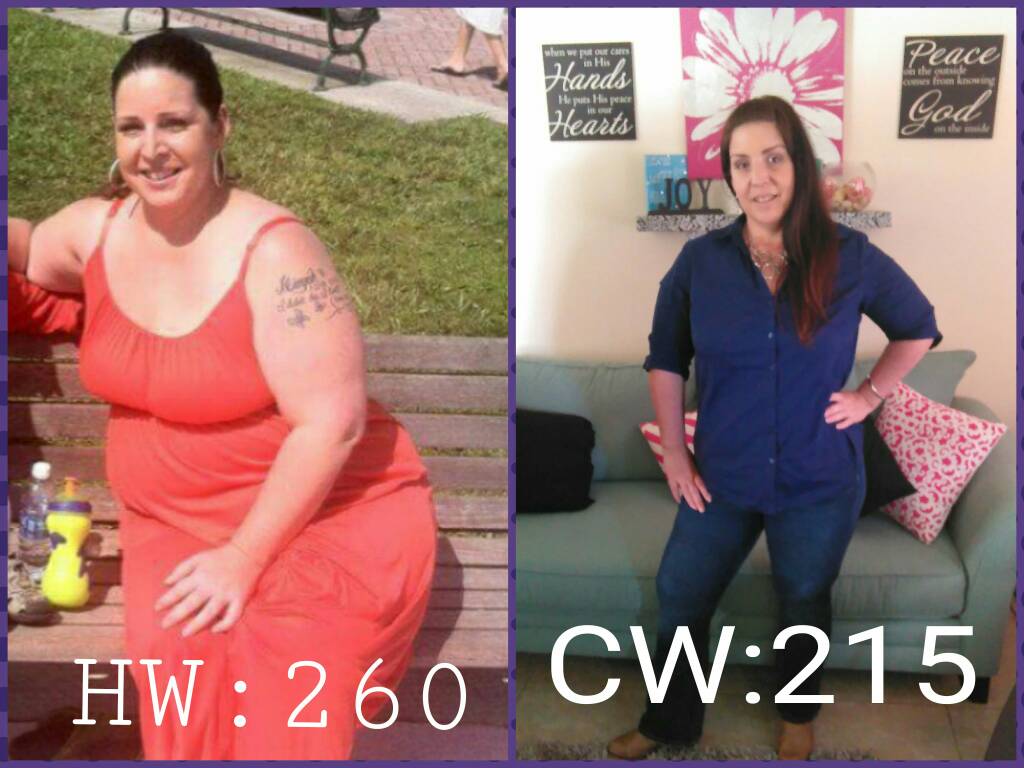
Before and after! I'm 6wks out! HW260 SW244 CW215 The before pic was taken this past mother's day.. My surgery was 11/16/15

-
Exactly what the Dr said yesterday! REST!!!! He said I could of possibly caused the beginning of a hernia. So I'm doing nothing! And yes I have absolutely done too much! Thank you so much for Your advice and for sharing your experience ... I'm resting, resting, and resting! Lol its hard but I have come too far to mess something up. Dr orders and instructions are extremely important to follow... Even when life throws things at you its still important to take care of self first!
-
Thank you so much! I'm 4wks out.. I made appt for Thursday but my grandsons circumcision is the same day so I'm going this afternoon to get checked out! Hopefully it's not serious and like you I'll feel much better in two weeks!!
-
Hi everyone.. It's been forever since I've been on here. So many things happened after my surgery idk where to begin. I was sleeved 11/16/15. I've had no issues at all. No nausea, vomiting, truly a success! I'm down 26 since SW and 42 lbs from my HW. 2weeks after my surgery my daughters water breaks! She had her baby 6weeks early. After an epidural I was of course helping her push while pushing her one of her legs, until she finally had him. I know this is long, but the baby had to be transported an hour away due to being premature. Since then which it's been 2weeks now I've been running non stop. Exhausted and I have this pain at one of my incision sites. It's excruciating at times. It's on my right side. I called my surgeons office and was told that's where they pulled out my stomach. But they want to see me thiursday. And also mentioned gall bladder ???? it's not!! However this morning I bent down to pic up my phone charger and OMG!!! It felt as though something tore inside of me. I know some pain is normal. But it hurts to bend over, turn over when I'm sleeping and sometimes just standing. Has anyone else had this sort of pain? Was it serious? I am taking it easy now since the baby is home. I have a tendency to put others before me and now I've potentially hurt myself for doing so.