huynhston
Pre Op
-
Joined
-
Last visited
Everything posted by huynhston
-
When colleagues feel comfortable enough to confess how they thought your weight was "absolutely disgusting" before you started losing weight lol
-
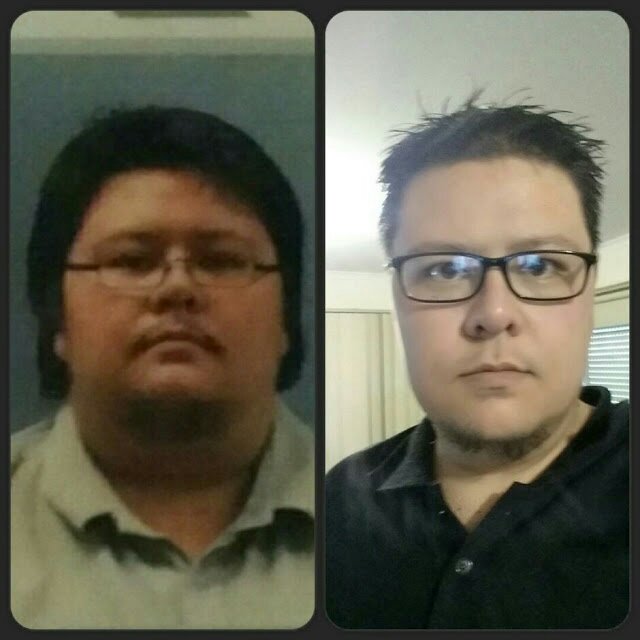
Ill have to get a body comparison later but heres a headshot from before surgery and at about the 6 month mark with a weight loss of about 154lbs. Im currently at 174lb total loss as of my last weigh in

-
I cant eat meals at the sane pace as everyone else which results in me picking at it for about an hour or so. Its troublesome when I have dinner at a friends because they think I dont like their cooking lol I think people are needlessly afraid of grazing. As long ad your total calorie intake is lower then your resting calorie amount and you get regular excercise in grazing doesnt ned to be seen as a bad thing.
-
Prove em wrong lol. They may feel like they have your best interests at heart but you know yourself better then anyone. Best way is to show them in the long run. I have a friend who is an excersise physiologist and had reservations about me having the surgery. Now hes one of my workout partners now that ive shown it was the right thing for me to do lol But on the most part I was lucky and had very supportive friends and family
-
Man I wish I could eat bread that soon lol. Im 8 months out and still struggle with bread alot of the time. Maybe try pureeing your food as you might be able to get in more calories. I found that if I cooked chicken like normal I could only stomach maybe a bite or two but if it was vitamized or pureed with some vegies I could take in a considerably larger amount. Also have you started taking multi Vitamins? The lack of energy will pass once everything settles down. Its only been 14 days its still early days
-
Im trying the approach of incorporating fitness in amongst my everyday routine and finding active things to do that I enjoy. So I took up boxing and now also run a few sessions a week with friends to help keep me motivated and also fell in love with kettlebells. You get amazing full body workouts and I find em fun. I also use resistance bands whe n im gaming with friends at my desk and do a few sets in between matches or when I die. This way I dont have set "workout" times. I also learnt to not beat myself up if I slack off here and there....we are all human and we slip up most of us are on point 100% of the time. And hey....if you havent gained anything thats better then gaining xD
-
Lol seems like im reppin australia solo styles at the moment xD
-
If you send your body into starvation mode youll not lose the weight....600 calories seems like a really low amount even for an average person.... You need the calories to make sure you lose fat and not muscle mass. Id speak to a nutritionist but 600 calories coupled with regular excersise seems like it could be damaging if done long term :s
-
Youll be right...I was kept in hospital for 5 days after my surgery because I wasnt taking in any liquids and could move about lol welcome to your new life!
-
I thought I was going crazy because food turns me off too at this point ????. Good to know I'm not the only one! I make myself eat in order to get my Protein in but I find if I ignore feelings of hunger a minute or two that feeling disappears. I worry more about when I go back to work next week....what will I be able to eat? I can't just run to the bathroom if it doesn't agree with me and throwing up in the trashcan next to my desk isn't appealing at all ????. I work nights triaging patients via telephone and often by myself so the fears are valid. No one said this would be easy but I hope it isn't more difficult than it has been with my inability to transition to food from liquids at this point! Michelle It all comes down to a patience game I think lol ive had some friends who were back on normal foods within a week or so which blows my mind considering how long it took me. I was never fussed about being able to eat certain foods only thing that worried me was getting in enough nutrients when I started working iut again...even now I struggle and get really lethargic after a few good sessions. With food at work id just play it safe I think. Take stuff you know for certain you wont struggle with. Even if its youghurt or puree stuff. I found eating around other people difficult as I would get back into old habits and eat quicker then my body could tolerate. Had to literally relearn how to eat...took me a few weeks lol It will all settle down and normalise you just have to give your body time
-
I think it was close to a month before I was on anything that wasnt pureed and even then I was limited. 8 months on and only just starting to be able to handle normal food but I found that due to not being able to eat anything that I started getting turned off of food. I eat cause I need energy when I work out and whatnot but nothing tickles my fancy anymore lol But im with alot of people....dont rush it youll get back to real food eventually but I feel rhats the signal that the surgery has done the most of its work and now its up to ke to continue it myself without relapsing
-
Hey all... apart from my surgery I enjoy playing music, currently play the guitar and ukulele (most fun instrument ever!!) I play regularly for my local church and enjoy playing and listening to all styles of music. Also a bit of a gamer and a nerd at heart lol play online with friends over Skype most nights but its definitely not an addiction like it once was. Since the surgery and having lost some Initial weight ive had friends ask me to run some fitness/boxing sessions with them as they want to get fit as well so I do 4 sessions a week with them which I find really fun. I currently volunteer my time interacting with aged care clients who have a disability of some form. Its fun stuff and something I never thought id like doing but im about to start my diploma in youth justice as working with troubled youth is one of my passions and I cant wait to get stuck into my studies and work. Theres not much else to me lol i get along with most people so feel free to say hi or whatnot its been awesome reading about other people's stories
-
Had my surgery on 3rd oct 2014 where I was at my heaviest at 268kg which I think was a bmi of 77??? Im 5"11 and have lost 79kg so far (174 lbs). Bmi now is still high at 51 but definetly making progress! Making sure I dont lose it too quick and make sure its sustainable this time.