Skip to content
View in the app

A better way to browse. Learn more.

BariatricPal

A full-screen app on your home screen with push notifications, badges and more.

To install this app on iOS and iPadOS
  1. Tap the Share icon in Safari
  2. Scroll the menu and tap Add to Home Screen.
  3. Tap Add in the top-right corner.
To install this app on Android
  1. Tap the 3-dot menu (⋮) in the top-right corner of the browser.
  2. Tap Add to Home screen or Install app.
  3. Confirm by tapping Install.

619Raf

Pre Op
  • Joined

  • Last visited

Everything posted by 619Raf

  1. You look fabulous ????! Keep up the good work! Congratulations you look fabulous!! I really want to do the color run!
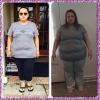
  2. I still have a long ways to go but here is a before and after picture. I was sleeved on 1/15/2015 HW: 324 SW: 311 CW:256 The picture on right is from February 15, 2015 My journey is just beginning I have hit stall after stall but I am not giving up. I been at a stall for about a month, some days are better than others. At times I can eat very little and be good all day and some days I feel like I can eat a lot more. I do workout 6 days a week for the most part.
  3. I read your entire blog, I loved it! If you don't mind me asking how old are you? I might of missed it on your blog. You look so young in your pics with your daughters, you guys look like sisters.????

Trending Products

PatchAid Vitamin Patches

Account

Navigation

Search

Search

Configure browser push notifications

Chrome (Android)
  1. Tap the lock icon next to the address bar.
  2. Tap Permissions → Notifications.
  3. Adjust your preference.
Chrome (Desktop)
  1. Click the padlock icon in the address bar.
  2. Select Site settings.
  3. Find Notifications and adjust your preference.