




Skip to content
View in the app

A better way to browse. Learn more.

BariatricPal

A full-screen app on your home screen with push notifications, badges and more.

To install this app on iOS and iPadOS
  1. Tap the Share icon in Safari
  2. Scroll the menu and tap Add to Home Screen.
  3. Tap Add in the top-right corner.
To install this app on Android
  1. Tap the 3-dot menu (⋮) in the top-right corner of the browser.
  2. Tap Add to Home screen or Install app.
  3. Confirm by tapping Install.
  • Appearance

Join BariatricPal free

  • Ask your own questions
  • Reply and follow topics
  • Message other members
  • No cost, no spam

outofhere

Gastric Sleeve Patients
  • Joined

  • Last visited

Everything posted by outofhere

  1. Hi there, Another Sydney sleever here, I had mine on the 14th May and couldn't be happier. Look forward to hearing how your journey goes
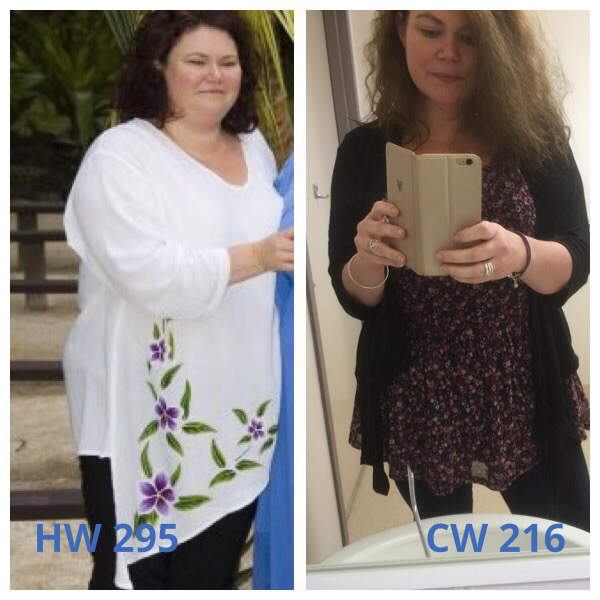
  2. Hi there......I'm a quiet lurker here but wanted to share, I keep saying to people I don't see the difference until my sister sent me a pic of me at her wedding when I was at my highest weight......I still have a long way to go but my surgery was in May and I am feeling great and can happily say I definitely see the difference now
  3. Oh I'm so pleased I'm not the only one, I keep telling people I don't think they actually did the surgery, just stuck me with knives so it looks like the did lol My surgery was on the 14th of May, my dietician said that it's good I don't feel restrictions or any pain etc because I'm obviously not pushing it, so I will listen to what she says but sometimes I would like a little side effect just so I know it's doing its job
Account

Navigation

Search

Search

Configure browser push notifications

Chrome (Android)
  1. Tap the lock icon next to the address bar.
  2. Tap Permissions → Notifications.
  3. Adjust your preference.
Chrome (Desktop)
  1. Click the padlock icon in the address bar.
  2. Select Site settings.
  3. Find Notifications and adjust your preference.