Skip to content
View in the app

A better way to browse. Learn more.

BariatricPal

A full-screen app on your home screen with push notifications, badges and more.

To install this app on iOS and iPadOS
  1. Tap the Share icon in Safari
  2. Scroll the menu and tap Add to Home Screen.
  3. Tap Add in the top-right corner.
To install this app on Android
  1. Tap the 3-dot menu (⋮) in the top-right corner of the browser.
  2. Tap Add to Home screen or Install app.
  3. Confirm by tapping Install.
  • Appearance

Join BariatricPal free

  • Ask your own questions
  • Reply and follow topics
  • Message other members
  • No cost, no spam

bjb3360

Gastric Sleeve Patients
  • Joined

  • Last visited

  1. where can I get the food and nutrion magazine email address is bonemorony0256@yahoo.com
  2. I had the sleeve in June of 2013 in Great Falls, Mt. and had a leak 4 times with in a 6 month period also during that time also 4 infections due to the leak. But as of today I feel great and yes I would do it again and I would say this operation is the best out of the one's they offer.
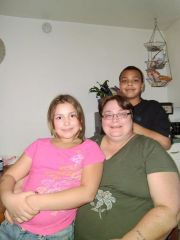
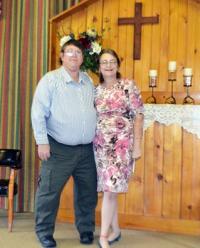
  3. Images added to a gallery album owned by bjb3360 in Before and After Gastric Sleeve Photos
    bjb3360, a weight loss surgery photo album by bjb3360 on BariatricPal. 2 photos in Before and After Gastric Sleeve Photos.
  4.    ProudGrammy reacted to a post in a topic: Who Are You?
  5.    keish_lorraine reacted to a post in a topic: Who Are You?
  6. Hello my is Bonnie and i had my gastric sleeve June 24,2013, This is me after the surgery. After the surgery in Great Falls, Mt i ended up with 4 infections and back at the hospital that many times, i started at 310 Lbs and during that time i couldn't eat or drink anything and keep it down so i lost more weight then was expected, then i ended up with not enough vitemins in my body that i started loosing my hair so now im on so many that its unbeliveable. But after a year of fight to stay healthy im doing well, im down to 175 Lbs now and feel great.


Account

Navigation

Search

Search

Configure browser push notifications

Chrome (Android)
  1. Tap the lock icon next to the address bar.
  2. Tap Permissions → Notifications.
  3. Adjust your preference.
Chrome (Desktop)
  1. Click the padlock icon in the address bar.
  2. Select Site settings.
  3. Find Notifications and adjust your preference.