




Skip to content
View in the app

A better way to browse. Learn more.

BariatricPal

A full-screen app on your home screen with push notifications, badges and more.

To install this app on iOS and iPadOS
  1. Tap the Share icon in Safari
  2. Scroll the menu and tap Add to Home Screen.
  3. Tap Add in the top-right corner.
To install this app on Android
  1. Tap the 3-dot menu (⋮) in the top-right corner of the browser.
  2. Tap Add to Home screen or Install app.
  3. Confirm by tapping Install.
  • Appearance

Join BariatricPal free

  • Ask your own questions
  • Reply and follow topics
  • Message other members
  • No cost, no spam

2013forme2

Gastric Sleeve Patients
  • Joined

  • Last visited

Everything posted by 2013forme2

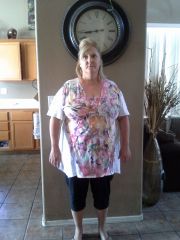
  1. Images added to a gallery album owned by 2013forme2 in Before and After Gastric Sleeve Photos
    2013forme, a weight loss surgery photo album by 2013forme2 on BariatricPal. 1 photo in Before and After Gastric Sleeve Photos.
  2. Wow lot in common with all off you. I had my surgery on the 15th too. I walked in for preregistration at 12:30 on the 15th and walked out @ 10:30pm the same day. I went for my follow up appointment with my Dr. on the 22nd and found out that he fixed my hiatal hernia funny thing is I didn’t know I had it lol. Well I am down 16lbs today and feeling good just tired sometimes. Hope you are all feeling great
Account

Navigation

Search

Search

Configure browser push notifications

Chrome (Android)
  1. Tap the lock icon next to the address bar.
  2. Tap Permissions → Notifications.
  3. Adjust your preference.
Chrome (Desktop)
  1. Click the padlock icon in the address bar.
  2. Select Site settings.
  3. Find Notifications and adjust your preference.