



Skip to content
View in the app

A better way to browse. Learn more.

BariatricPal

A full-screen app on your home screen with push notifications, badges and more.

To install this app on iOS and iPadOS
  1. Tap the Share icon in Safari
  2. Scroll the menu and tap Add to Home Screen.
  3. Tap Add in the top-right corner.
To install this app on Android
  1. Tap the 3-dot menu (⋮) in the top-right corner of the browser.
  2. Tap Add to Home screen or Install app.
  3. Confirm by tapping Install.
  • Appearance

Join BariatricPal free

  • Ask your own questions
  • Reply and follow topics
  • Message other members
  • No cost, no spam

island_son

Gastric Sleeve Patients
  • Joined

  • Last visited

  1.    island_son reacted to a post in a topic: VSG Urban Legends
  2. nervous.. but excited to start my new life.. having it performed at O-Band center in Las Vegas.. Startng weight is 266..
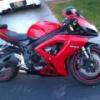
  3. ^ yeah I'm a bit of a gearhead.. that'smy bike and my 475horsepower Subaru WRX in my thumbnail pic. I also have an 08 Mercedes Benz C350. I got the toys, I just need the body to match! LOL
  4. Thanks for the support guys! where do you get your protein powders from? I wanna start buying my powders and supplements now..
  5. My names Greg. I live in Las Vegas. Looking forward to my surgery but nervous at the same time. I've been looking at some of your Before and After pics and wow.. some of you dont even look like the same person! I'm turning 40 in 12 days and it's time for a new begining for me. Looking forward to meetingnew people here and for support..

Account

Navigation

Search

Search

Configure browser push notifications

Chrome (Android)
  1. Tap the lock icon next to the address bar.
  2. Tap Permissions → Notifications.
  3. Adjust your preference.
Chrome (Desktop)
  1. Click the padlock icon in the address bar.
  2. Select Site settings.
  3. Find Notifications and adjust your preference.