Skip to content
View in the app

A better way to browse. Learn more.

BariatricPal

A full-screen app on your home screen with push notifications, badges and more.

To install this app on iOS and iPadOS
  1. Tap the Share icon in Safari
  2. Scroll the menu and tap Add to Home Screen.
  3. Tap Add in the top-right corner.
To install this app on Android
  1. Tap the 3-dot menu (⋮) in the top-right corner of the browser.
  2. Tap Add to Home screen or Install app.
  3. Confirm by tapping Install.

ValG

LAP-BAND Patients
  • Joined

  • Last visited

  1.    elgrande reacted to a gallery image: Lookin good!
  2.    voldemort reacted to a gallery image: 12875808 3151 thumb
  3.    sweets27 reacted to a gallery image: 12875808 3151 thumb
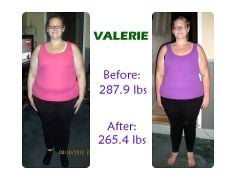
  4. Congrats on such a big loss! I have my first appointment with the doctor tomorrow and have all my classes and testing scheduled. I can't wait to get this thing going! So far I have lost 35 pounds on my own and I am hoping that by the time I get the surgery I will only have 60 to 70 pounds left to lose. I am definitely nervous though, I am hearing mixed emotions on this site and not sure what to think about it. Some people are doing really well, while others haven't lost anything yet.
  5. Love the idea and meaning behind the onederland tattoo! Hoping that one day I will be able to get something symbolic of hitting that goal as well!

Trending Products

PatchAid Vitamin Patches

Account

Navigation

Search

Search

Configure browser push notifications

Chrome (Android)
  1. Tap the lock icon next to the address bar.
  2. Tap Permissions → Notifications.
  3. Adjust your preference.
Chrome (Desktop)
  1. Click the padlock icon in the address bar.
  2. Select Site settings.
  3. Find Notifications and adjust your preference.