





Skip to content
View in the app

A better way to browse. Learn more.

BariatricPal

A full-screen app on your home screen with push notifications, badges and more.

To install this app on iOS and iPadOS
  1. Tap the Share icon in Safari
  2. Scroll the menu and tap Add to Home Screen.
  3. Tap Add in the top-right corner.
To install this app on Android
  1. Tap the 3-dot menu (⋮) in the top-right corner of the browser.
  2. Tap Add to Home screen or Install app.
  3. Confirm by tapping Install.
  • Appearance

2020-Jan-24

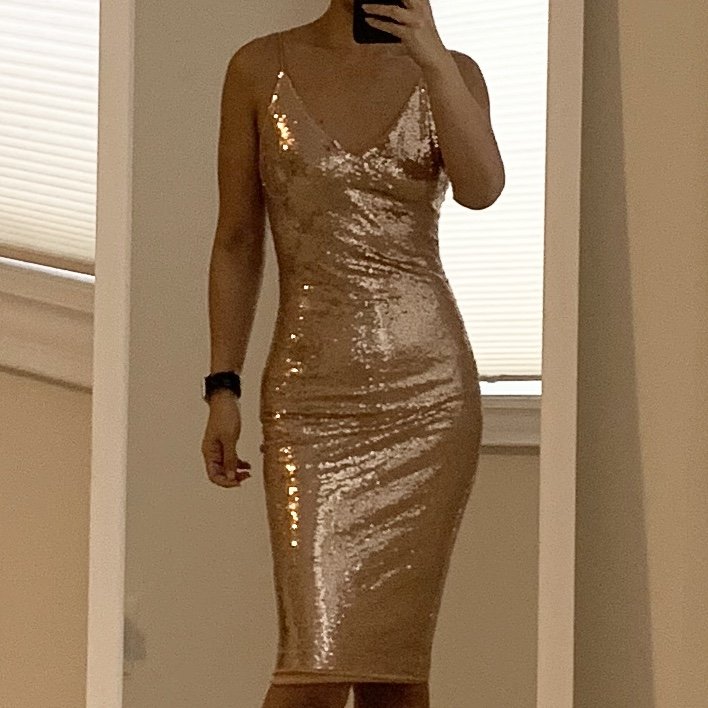
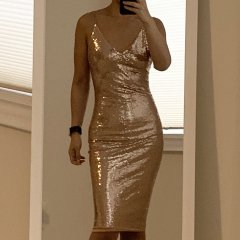
Case in point. This dress is an XS. It's a little big on me up top (the straps are def too long and need to be shortened; a little too much extra fabric bunching in the sternum area), AND the dress will probably end up being a little big in the lower tummy area too whenever the swelling goes down (you can see the fabric stretching over my early-stage-preggo-looking belly). However. Despite me having absolutely no place to go to wear this to in the near future, it was like $23 (Canadian) dollars so I figure, why not? ?

From the album:

ms.sss OOTDs

· 138 images

Photo Information

  • Taken with Apple iPhone XR
  • Focal Length 4.3 mm
  • Exposure Time 1/61
  • Aperture f/1.8
  • ISO Speed 100

Account

Navigation

Search

Search

Configure browser push notifications

Chrome (Android)
  1. Tap the lock icon next to the address bar.
  2. Tap Permissions → Notifications.
  3. Adjust your preference.
Chrome (Desktop)
  1. Click the padlock icon in the address bar.
  2. Select Site settings.
  3. Find Notifications and adjust your preference.