






Skip to content
View in the app

A better way to browse. Learn more.

BariatricPal

A full-screen app on your home screen with push notifications, badges and more.

To install this app on iOS and iPadOS
  1. Tap the Share icon in Safari
  2. Scroll the menu and tap Add to Home Screen.
  3. Tap Add in the top-right corner.
To install this app on Android
  1. Tap the 3-dot menu (⋮) in the top-right corner of the browser.
  2. Tap Add to Home screen or Install app.
  3. Confirm by tapping Install.
  • Appearance

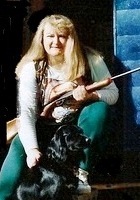
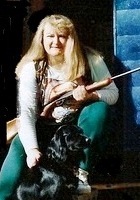
Hunting with Petunia
Petunia was a good hunting dog, flushing grouse at just a few months old. Her mother was a black occker spaniel and her father was a black lab. Great all 'round hunting dog, but 4-wheel drive over the old logging trails made her throw up on my new suede gun case! This is an old picture, but will serve as inspiration simply because one of my main goals for losing weight is to be able to hunt again.

From the album:

Things I Love

· 5 images

Account

Navigation

Search

Search

Configure browser push notifications

Chrome (Android)
  1. Tap the lock icon next to the address bar.
  2. Tap Permissions → Notifications.
  3. Adjust your preference.
Chrome (Desktop)
  1. Click the padlock icon in the address bar.
  2. Select Site settings.
  3. Find Notifications and adjust your preference.