Skip to content
View in the app

A better way to browse. Learn more.

BariatricPal

A full-screen app on your home screen with push notifications, badges and more.

To install this app on iOS and iPadOS
  1. Tap the Share icon in Safari
  2. Scroll the menu and tap Add to Home Screen.
  3. Tap Add in the top-right corner.
To install this app on Android
  1. Tap the 3-dot menu (⋮) in the top-right corner of the browser.
  2. Tap Add to Home screen or Install app.
  3. Confirm by tapping Install.
  • Appearance

Join BariatricPal free

  • Ask your own questions
  • Reply and follow topics
  • Message other members
  • No cost, no spam

Mschwartz924

Pre Op
  • Joined

  • Last visited

Everything posted by Mschwartz924

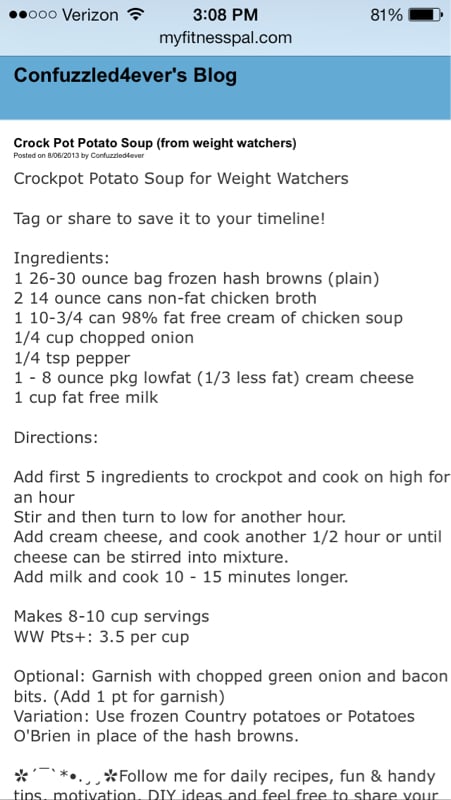
  1. I was sleeved on 4/16 and yesterday the hungry came back :/ I made this soup today and it was so good!! I put a serving through my magic bullet and strained it but there were no pieces left. It was warm, filling and a great change from protein shakes and Popsicles!
  2. I was just sleeved on 4/16. Today I made this soup. I then put it in my magic bullet and strained it but there were no pieces in it at all it tastes amazing!! A nice change from protein shakes and Popsicles! I will try adding unflavored protein powder on the next serving. Of course I can eat very little of it but it tasted so yummy!!
Account

Navigation

Search

Search

Configure browser push notifications

Chrome (Android)
  1. Tap the lock icon next to the address bar.
  2. Tap Permissions → Notifications.
  3. Adjust your preference.
Chrome (Desktop)
  1. Click the padlock icon in the address bar.
  2. Select Site settings.
  3. Find Notifications and adjust your preference.