




Skip to content
View in the app

A better way to browse. Learn more.

BariatricPal

A full-screen app on your home screen with push notifications, badges and more.

To install this app on iOS and iPadOS
  1. Tap the Share icon in Safari
  2. Scroll the menu and tap Add to Home Screen.
  3. Tap Add in the top-right corner.
To install this app on Android
  1. Tap the 3-dot menu (⋮) in the top-right corner of the browser.
  2. Tap Add to Home screen or Install app.
  3. Confirm by tapping Install.

Emergency Preparedness

Today, I was reading a list of guidelines regarding supplies that households should keep on hand to survive 3 or more days in case of earthquakes, winter utility outages, etc. One prominent requirement is to have non-perishable foods stocked, for example, but many of the emergency kits seem to be hugely slanted towards pasta. I wonder if anyone here keep an emergency kit stocked, and, if so, what do you stock for your non-perishable bariatric food needs?

  • Replies 2
  • Views 1.4k
  • Created
  • Last Reply

Top Posters In This Topic

Most Popular Posts

  • Not that we need to have emergency food kits in Australia, but I always have multiple tins of beans, tomatoes, tuna & salmon in my cupboard - you know in case of a zombie apocalypse. I also have l
Posted Images

Featured Replies

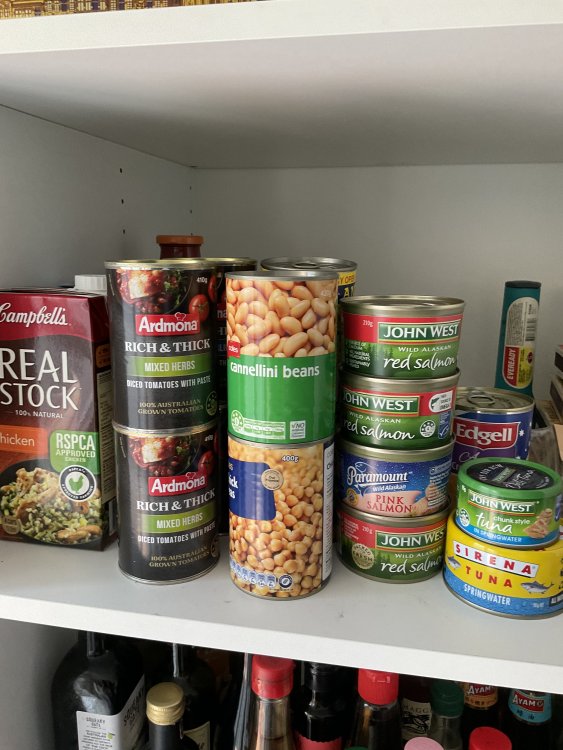
Not that we need to have emergency food kits in Australia, but I always have multiple tins of beans, tomatoes, tuna & salmon in my cupboard - you know in case of a zombie apocalypse. I also have liquid stock & stock powder, powdered milk & rolled oats. You can make a lot of one pot meals with them - cassoulets, stews, soups. Throw in a couple of tins of lentils & vegetables & you’ll be set. (The beans & lentils are a good source of protein.) And not a packet of rice or pasta needed. If you do want to include a pasta try those made from soya beans, endame, etc. I still find them too heavy & filling but others don’t have issues once in maintenance.

A0A4E57A-51A3-4BB6-9629-F9710FCE6DBA.thumb.jpeg.498a6e3a6d288732693b6999a7a62035.jpeg

Join the conversation

You can post now and register later. If you have an account, sign in now to post with your account.

Guest
Reply to this topic...

Trending Products

PatchAid Vitamin Patches

Account

Navigation

Search

Search

Configure browser push notifications

Chrome (Android)
  1. Tap the lock icon next to the address bar.
  2. Tap Permissions → Notifications.
  3. Adjust your preference.
Chrome (Desktop)
  1. Click the padlock icon in the address bar.
  2. Select Site settings.
  3. Find Notifications and adjust your preference.