Hi, to all my other May sleevers out there. So everyone should be at or close to their two months surgiversary. Congratualtions!!! I hope everyone is doing well and on the right track to feeling back to normal. I just wanted to post this so everyone could share their own update and also any down falls they have had. We are all new to the process and can share in the new sleeve experience together. I have been keeping a pretty detailed blog, 1 monthly, of my stats including weight loss, sizes, inches and personal notes if anyone is looking for more information. So good news I am 10 weeks out and down 41lbs. Yippee!! Can't wait to see what another two months will bring.I am attaching a pic from back in January at my heaviest of aroun 273lbs. My best friend and I were on our way back from the chili bowl and oh my do I look horrible. I am sure I can show a better pic of me, but this is a full body shot I found which is rare. Plus I dont want to disguise how big I really was. The second pic is just of last week before going out with friends. 40+ lbs. makes a differnce.





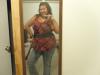

Hi, to all my other May sleevers out there. So everyone should be at or close to their two months surgiversary. Congratualtions!!! I hope everyone is doing well and on the right track to feeling back to normal. I just wanted to post this so everyone could share their own update and also any down falls they have had. We are all new to the process and can share in the new sleeve experience together. I have been keeping a pretty detailed blog, 1 monthly, of my stats including weight loss, sizes, inches and personal notes if anyone is looking for more information. So good news I am 10 weeks out and down 41lbs. Yippee!! Can't wait to see what another two months will bring.I am attaching a pic from back in January at my heaviest of aroun 273lbs. My best friend and I were on our way back from the chili bowl and oh my do I look horrible. I am sure I can show a better pic of me, but this is a full body shot I found which is rare. Plus I dont want to disguise how big I really was. The second pic is just of last week before going out with friends. 40+ lbs. makes a differnce.