Christine99
Gastric Sleeve Patients
-
Joined
-
Last visited
Everything posted by Christine99
-
I put eggs in Water, bring to a boil, shut heat off and cover let sit for 15 mins...shock with cold water I always have hb eggs that are easy to peel
-
Christine99, a weight loss surgery photo album by Christine99 on BariatricPal. 4 photos in Before and After Gastric Sleeve Photos.
-
Ahh the US over Mexico... I would double check into your policy. I have UHC and my surgery was covered. It may be that if you are not cover a certain BMI you need a co-morbidity (sleep apnea, high blood pressure) to qualify for the surgery (at least thats what it was for my insurance policy) Some employers have riders on the insurance that do not cover bariactric surgery, I would suggest you call the insurance company and find out.
-
love them! I too bought the sample pack by calling them. If you do a search in the forums you will find the number. My personal fav is the peach...but all of them are pretty good. They certainly break up the monotony of vanilla and chocolate
-
I have a couple glasses of wine every Thursday when I play pool. I was soo paranoid of how it would effect me so I hadn't for a while. For me...no difference then before If you want to have a drink, my suggestion would be for the first couple times you do have a drink, either be home, or out with a driver so that if you get really buzzed you do not have to drive
-
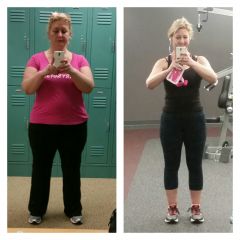
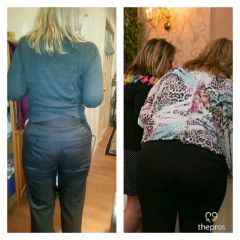
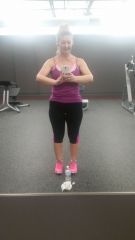
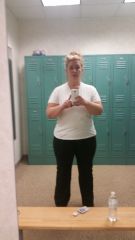
Thank you!! In the top pic I was 260 (January 1015) bottom is 175 (January 2016) I have been going ro gym 5 days per week since Jan 15...sleeved in July 15
-
when i saw the before I gasped...now I am soo happy it was captured lol
-
sure thing good luck!I would suggest doing your own researching online, no just here and not just what your Nut/Dr tells you...what are the differences between collagen vs whey protein.I have been about the same since Nov 21st Dont stress the stalls...its your body adjusting as long as you are exercising and eating right the weight will come off!I read about these here on the forum and was soo excited...started drinking them (a little bit in Water like an enhancer) My NUT said they are garbage...its collagen Protein, not easily digested and we would only be absorbing a fraction. Not worth it and I havent used them since I have at least 6 of them I should bring back to Vitamin shoppeI use the "S Health" app on my phone faithfully...I track my exercise activity and every meal faithfully. It keeps me honest and I can assure that I am getting at least 75g of Protein a dayI go to the gym first thing...when getting ready after shower I drink a Protein shake...then about 30 mins later breakfast...eggs/special k protein/yogurt w/granola or sunflower or pumpkin seeds mid morning snack: yogurt with granola or pumpkin seeds/protein bar/kind bar lunch: protein and a veggie afternoon snack: usually something crunchy...I am addicted to the snap-pea baked snack/pb with applesauce dinner: protein and a veggieI strength train with weights 2x per week and cardio hiit 3x per week (elliptical/rowing/bike)Awesomeness!! Congrats!!I prefer the nectar drinks with Water. They offer a sample pack of many of their flavors @15 dont quote me lol...totally worth it 866-333-7403 you have to callIts better to lose slow that quick!! You are doing awesome. Your body is going through soo many adjustments, be patient... At times your weightloss will seem slow, other times fast.Christine99, I too have ending up with disgusting lumpy "Hot Chocolate"!! I use 6 oz. of hot water PLUS 2 ICE CUBES..stir until the ice is melted.. Mix the protein power in the "cooled" water, and once mixed, top off with another 6 ounces of hot water. It keeps the protein powder from coagulating. You have to mix it well in warm water/coffee first then top it off with hot water. I put vanilla powder in black decaf coffee and chocolate power in sugar free hot chocolate this way and it works. I will take your word for it LOLit was horrifying Totally something I would have tried at some point...lolWord of advice...dont mix chocolate protein powder with hot water...you wont get hot cocoa LOLwhat a great ideaI too was allowed on pureed stage...I have it at least once a week for Breakfast I mix in Protein power alsoI prefer sashimi too...I have had rolls but I am full after 3I too never quoted weekly amounts...just a % end result of 65% (approx 148 lbs) My average has been 2.5lbs per week