Dawnie Doo
Pre Op
-
Joined
-
Last visited
Everything posted by Dawnie Doo
-
I found this article to have very useful information. http://www.bariatric-surgery-source.com/pregnancy-after-weight-loss-surgery.html#Obese_Pregnancy Sent from my SM-G930T using the BariatricPal App
-
OMG so I'm not the only one with cold feet????? Lol Sent from my SM-G930T using the BariatricPal App
-
It's been 3 months since my gastric bypass surgery. I have what they think it's gastritis. If it doesn't heal with reflux meds they'll do an endoscopy to check for an ulcer. I've had a few episodes of dumping in which the longest lasted a few hrs. That, at this point, it's the worst of my symptoms. I'm also your height, my highest weight was 325. I weighed 285 at surgery. I'm now 238 lbs. My heart truly goes out to you, as I can identify with a few minor symptoms. I am definitely in prayer for you that this turns around!!!! With God all things are possible. Continue closely with your new doctor, get those Protein shakes in. It will take a while for your body to recognize that it's healing. Stay strong!!!! Dawnie_doo
-
Correction...325 was my highest weight in the first pic. Dawnie_doo
-
I would've made a full body comparison, but I never took full body pics lol I'll post some just before surgery and compare to now. Dawnie_doo
-
Thank you! Dawnie_doo Shucks lol thanks a bunch! Dawnie_doo
-
I had the bypass. I noticed it once I started eating solid foods...maybe about 6 days in. I was also struggling to get in fluids at the time. So that increased my chances Smh Essentially the elevated levels of sugar and fat in your system are dumped into your blood stream. How that demonstrates itself is different in everyone. If I wasn't dehydrated at the time I wonder if I would've felt it at all. Dawnie_doo
-
Yup! That's what several people told me. Mine actually got heavier. Those hormones! Lol Dawnie_doo
-
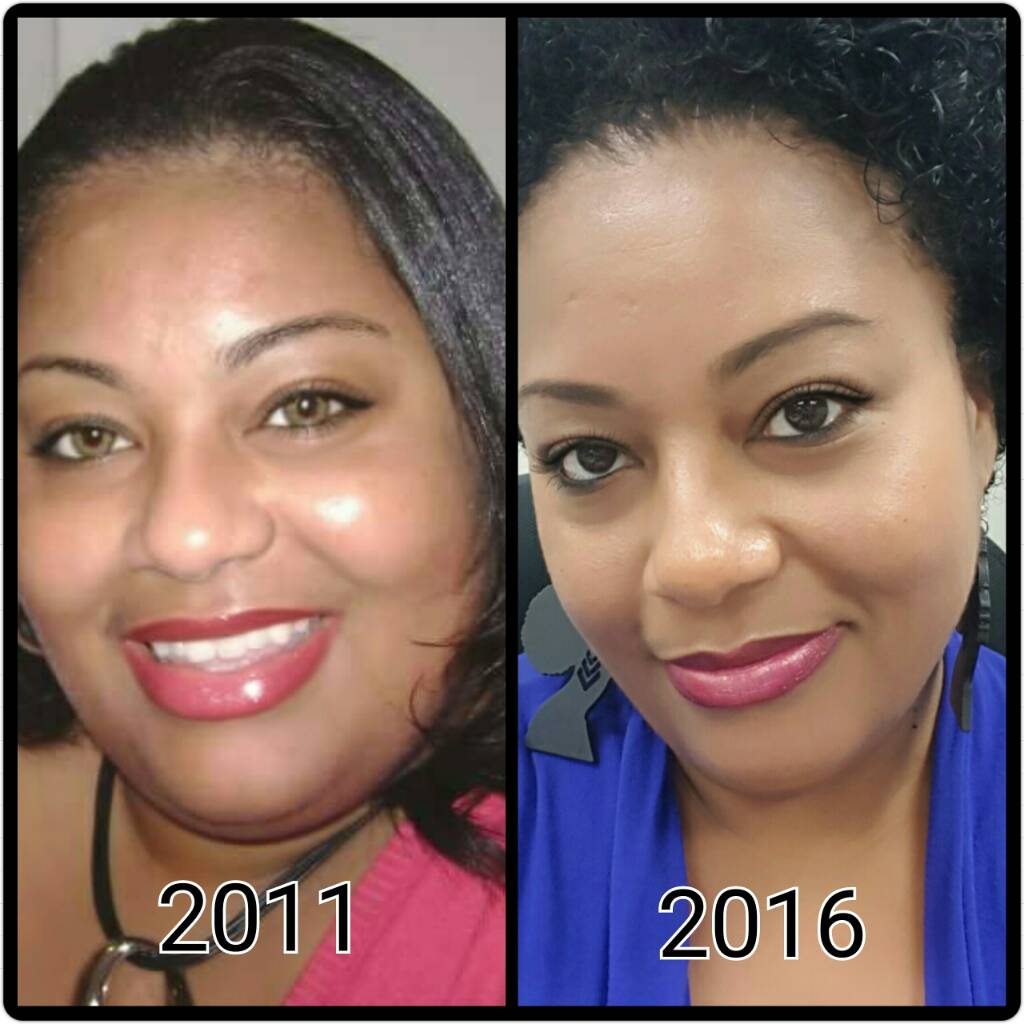
Such a huge difference in 5 years!!! I went from 293 my highest weight in 2011 to currently being 4 lbs away from what I weighed in 12th grade at 248 (I was always plump Lol). It's amazing what changes you'll make when you finally accept who you are!!! Dawnie_doo

-
I took my pain meds for 7 days. Only 1 each day. First bm was about day 4. Dawnie_doo
-
I purchased one and never wore it Smh Dawnie_doo
-
Thanks James! Dawnie_doo
-
I'm sending a request! Dawnie_doo
-
Hello everyone!!!! Long story short...even though I had a few minor hiccups, I would do this all over again!!!!! I feel amazing!!!! On stalling...I'm 2 months post op. I stayed the same weight for 2 weeks...dropped 3 lbs, and today 3 more. Lol It's so strange. Trust me, don't get frustrated. Just continue to do what's necessary and move forward! The weight will come off! Get that movement in, Protein up, and FLUIDS are a must!!! Perfect segway to dumping. I noticed that dumping affects me with heart palpitations or advanced beats. Sounds more scary than it is. I didn't even realize I was dumping until the doctor told me so. They said I'm fine. I noticed that avoiding grease and sugar, even naturally occurring sugar...and carbs helps. But what helps the most is drinking WATER!!!! It's very easy to get dehydrated, and that increases your chances of dumping, even from natural fats in chicken or fish (yes that happened to me). With all that said, I'm doing great!!!! I'm in the gym and walking outside about 5 days/week. Highest weight 325, start weight 293, surgery weight 285, current weight 247. 40 lbs in 2 months...not bad at all! Dawnie_doo
-
Don't get discouraged...it happened to me. It will go really slow, and then all of a sudden I'll lose 3 lbs in one day. When I started advancing in the levels it really slowed...it's to be expected. Continue to walk and move about. Drink water/liquids often. It's bound to come off. Keep me posted. Beginning week 7 post op. Highest Weight: 325, Start Weight: 293, Surgery Weight: 285, Current Weight: 255 Dawnie_doo
-
I switched from the sleeve to the bypass because of the increase with gastric issues. Dawnie_doo
-
Thanks! I actually was very hot when I woke up all emotional. Hmmm...I'm not even menopausal yet Lol I've also been rather...let's say, outspoken. Lol Oh well, it's all good ???? Dawnie_doo
-
I've heard that those after menopause have gotten their menstrual back. Pleasant surprise? Lol but I've heard several people say that. Dawnie_doo
-
Wow that was a perfect answer!Thank you! When I was in the hospital, as soon as the nurse told me that I needed NO medication for any comorbidities I cried like a baby!!! To this day EVERYTHING has been regulated. I've been able to monitor my blood sugar and blood pressure at home...all within a perfectly normal range!!! My primary says once my A1C is within normal range he'll consider me no longer diabetic...that's around October for the 3 month window. Yessss! I'm truly grateful and beyond blessed!!! Dawnie_doo
-
So I'm 3 weeks post op. Is it too early for these hormones to dump? Lol Some effects have been good...and the hubby agrees. 6 weeks is a longgggg time with hormones increasing lol But this morning I woke up tearful for no reason Smh I'm like what is up with these hormones Lol Anyone know a time frame for the estrogen surge? Dawnie_doo
-
Sounds a lot like my first night lol I'm 3 weeks post op and doing well. I'm down 25 lbs. Dawnie_doo
-
3 Simple Things You Can Do Every Day To Burn More Calories - Hello Healthy http://blog.myfitnesspal.com/3-simple-things-can-every-day-burn-calories/ Dawnie_doo
-
This article has helpful info. Check it out... 9 Signs of Progress That Aren’t a Number on the scale - Hello HealthyHello Healthy http://blog.myfitnesspal.com/9-signs-progress-arent-number-scale/ Dawnie_doo
-
You are doing well keep up the good work. When I got my 2 wk Check up I lost 13lbs. I asked the Dr was that good he said yes 20 was the Max in 2 weeks so I encourage you to keep doing what you are doing Sent from my VS987 using the BariatricPal App Thank you! I hit a slow down once I got to puree. I lost 3 lbs in the past 4 days. Hey, I'll take it! Lol Dawnie_doo
-
I like gastric sleeve support group. Sent from my VS985 4G using the BariatricPal App How do I access that group? I guess my issue with these groups is privacy. On FB people can see when you like a post or join a group. I want total privacy because very few people are aware of my surgery Smh Oh well, rant over Lol Dawnie_doo